
What this guide gives you
Most product brands trying to run paid social in 2026 have the same problem. The creative they need is short-form, vertical, talking-head, hand-held, looking-into-the-lens UGC. The supply they have access to is a small list of creators who each charge four figures per asset and turn around in a week. The output is what the algorithm wants. The cost is what the algorithm punishes you for not having more of.
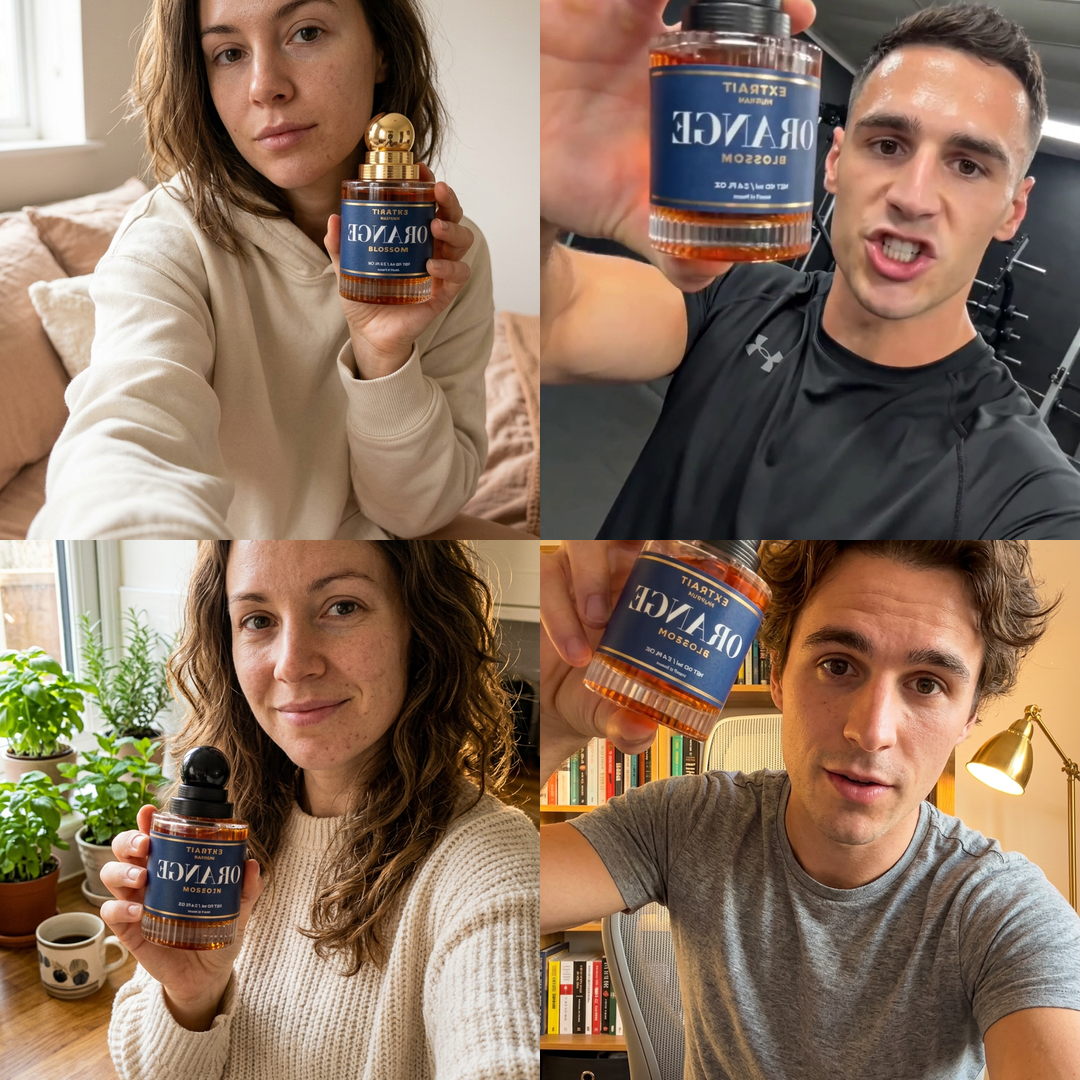
This guide hands you a Wireflow workflow that produces four pieces of that exact format from a single run. One product image. One script line. Four presets for the creator type (girl next door, gym bro, cozy mom, tech guy). The workflow assembles the prompt, the prompt feeds Seedance 2, and the output is a 9:16 video of a synthetic creator holding your actual product up to a front-facing phone camera, reading the line you wrote, in a real-looking room.
Who this is for
- Founders running paid social for a physical or digital product and struggling to keep creative volume high without burning the marketing budget on creators.
- Agencies that need to A/B test five hooks for the same product in a day, not a fortnight.
- Solo operators selling on Shopify, TikTok Shop, or Amazon who want to run a UGC test before committing to a real creator brief.
- Anyone curious about where synthetic-creator video is in mid-2026: the rough edges, the parts that work surprisingly well, and the workflow that pulls it together.
What you need before you start
- A Wireflow account. Free tier runs the workflow; paid is only needed for higher Seedance 2 quotas.
- One clean product image. Square, well-lit, transparent or solid background. The model uses this as a reference, so the cleaner the image, the closer the on-screen product matches.
- One sentence of script. The thing the creator says about your product, in their voice. There is a section below on what makes a line convert.
- About 90 seconds per video render. A full four-character pass is roughly six minutes.
Why faceless UGC is a real category now
The thing that changed in 2025 is identity stability across a video clip. Older models could produce one good frame and lose the face on frame two, or hold the face and lose the product, or hold both and produce a mouth that did not match the words. Seedance 2 holds all three on short clips, which is the unlock. The character looks like one person for the full eight seconds. The product looks like the product. The lip movement maps to the script line you wrote.
The other thing that changed is the price. A six-second piece of UGC from a freelance creator on a marketplace is, on the low end, around $150 plus a week of back-and-forth on the brief. The same six seconds out of this workflow is in the cents per render and ready in 90 seconds. The cost difference is large enough that a brand can run ten hooks instead of one and let the algorithm decide which one travels.
What this is not
- Not a replacement for a real creator with an audience. If the value is the creator's following, this does nothing. It replaces the supply of faceless, generic-creator-feel UGC that a brand uses on cold paid traffic, not the supply of trusted faces.
- Not a long-form tool. Seedance 2 clips are seconds, not minutes. The workflow is built for paid-social hook videos, not YouTube essays.
- Not a way to put a real person in your ad without their consent. The four presets in the workflow are described, not photographed; the output is a synthetic face that does not exist. Putting a real person into a prompt is a separate, harder problem and is out of scope here.
The three things you change per run
The workflow has a lot of nodes on the canvas, but only three of them are inputs you touch. Everything else is plumbing that was tuned once and locked.
1. The product image
Drop an image of your product into the Product Image node. Square format works best because Seedance 2 normalises to square internally during the reference pass. A transparent PNG works; a clean white background works almost as well. Avoid lifestyle photos with the product already in a hand; the model can confuse what is the product and what is the holder.
The image is passed into the Prompt Builder as a reference, and the assembled prompt explicitly tells Seedance to match it (same shape, label, colour, proportions). Without the reference image, the model invents a generic version of whatever you described in words, and you end up with the right shape of can but the wrong brand on it.
2. The script line
One sentence in the Script Line node. The default in the workflow ("This stuff literally changed my morning routine, I am not even kidding") is deliberately mid-sentence in feel. There is a whole section below on script lines that convert, but the short version: be specific, sound caught-mid-thought, and keep it under twelve seconds when spoken.
3. The character selector
The Character Style node is a dropdown that picks one of the four presets: Girl next door, Gym bro, Cozy mom, Tech guy. Switch the selection, re-run the workflow, get a new video. To make all four, run it four times. Each preset is its own room, its own lighting, its own wardrobe, its own apparent age, which is the whole point: one product, four faceless creators, four pieces of creative for the same hook.
The four character presets, in full
These four prompts are the load-bearing part of the workflow. They were tuned through a lot of failed runs. The shape of each one matters: a name, an age, a wardrobe, a location, a lighting cue, a hand-holding-the-phone cue, and a final tone word ("authentic", "cozy", "warm"). Drop any one of those clauses and the output starts to look generic.
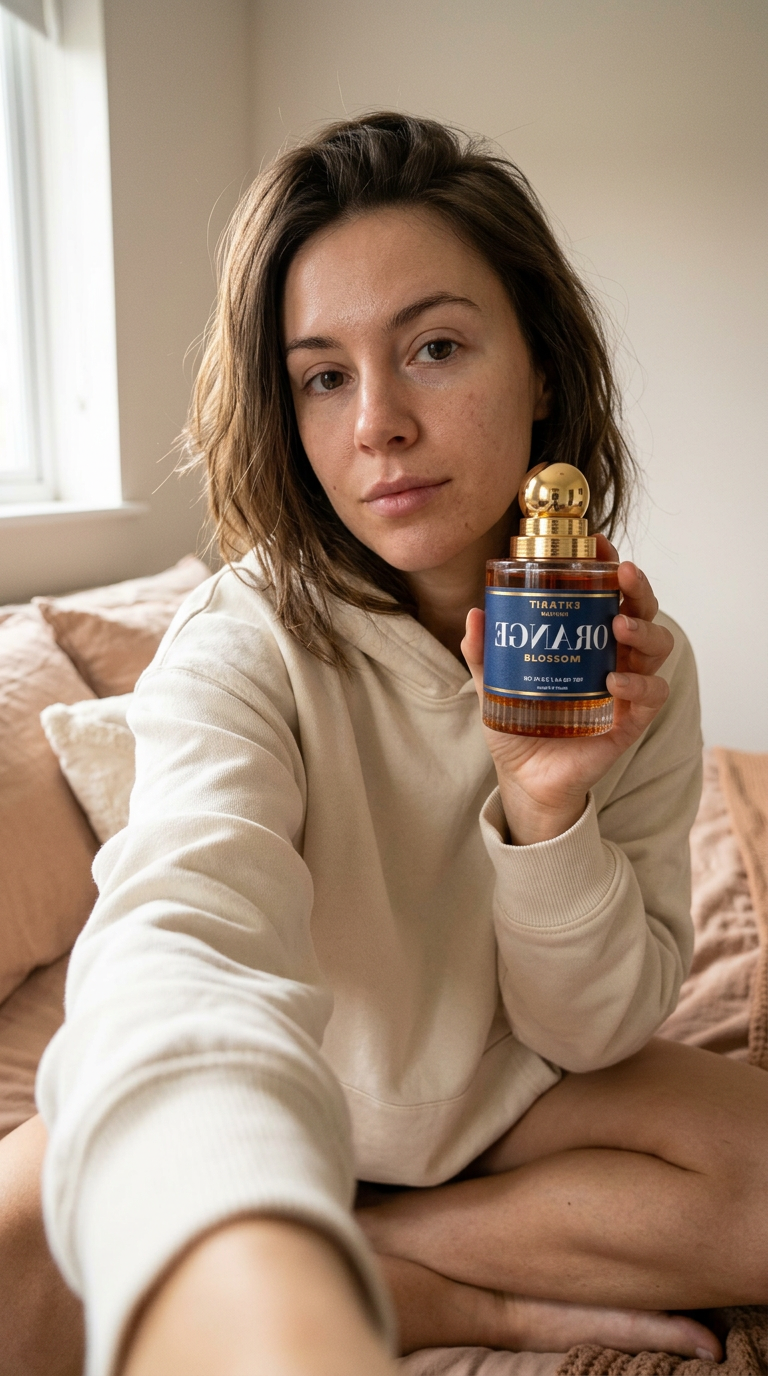
Girl next door
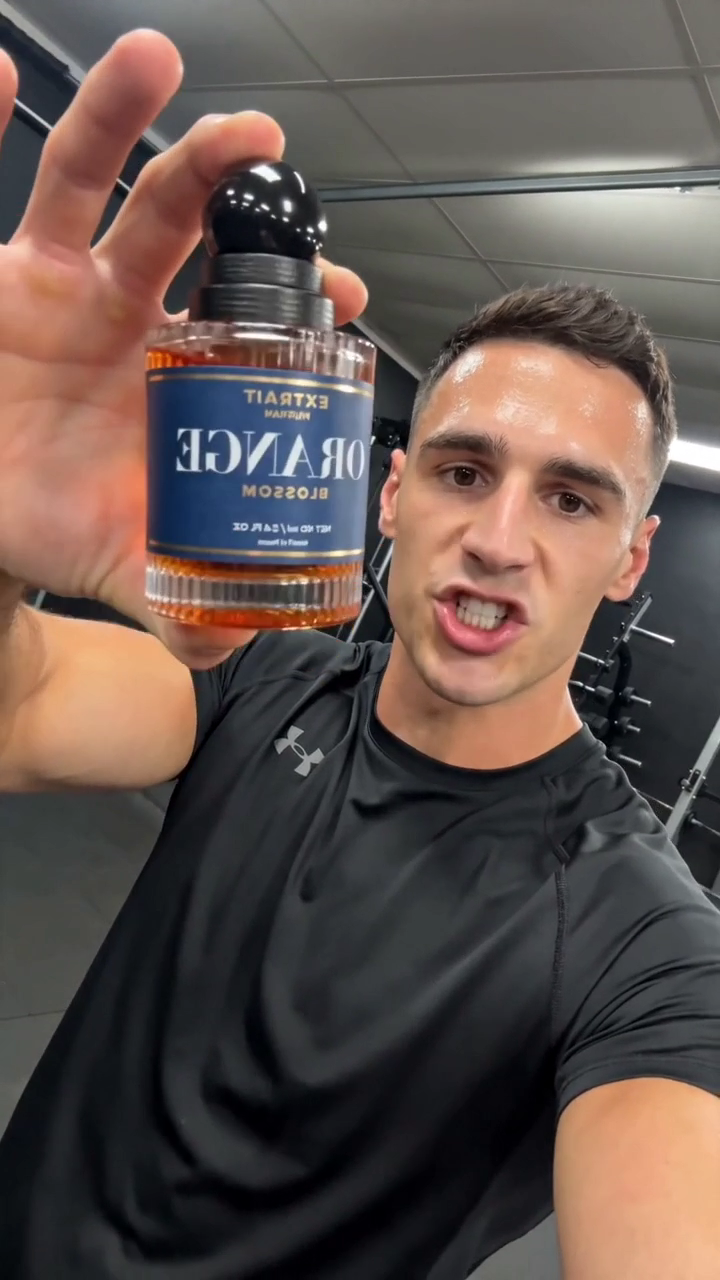
Gym bro
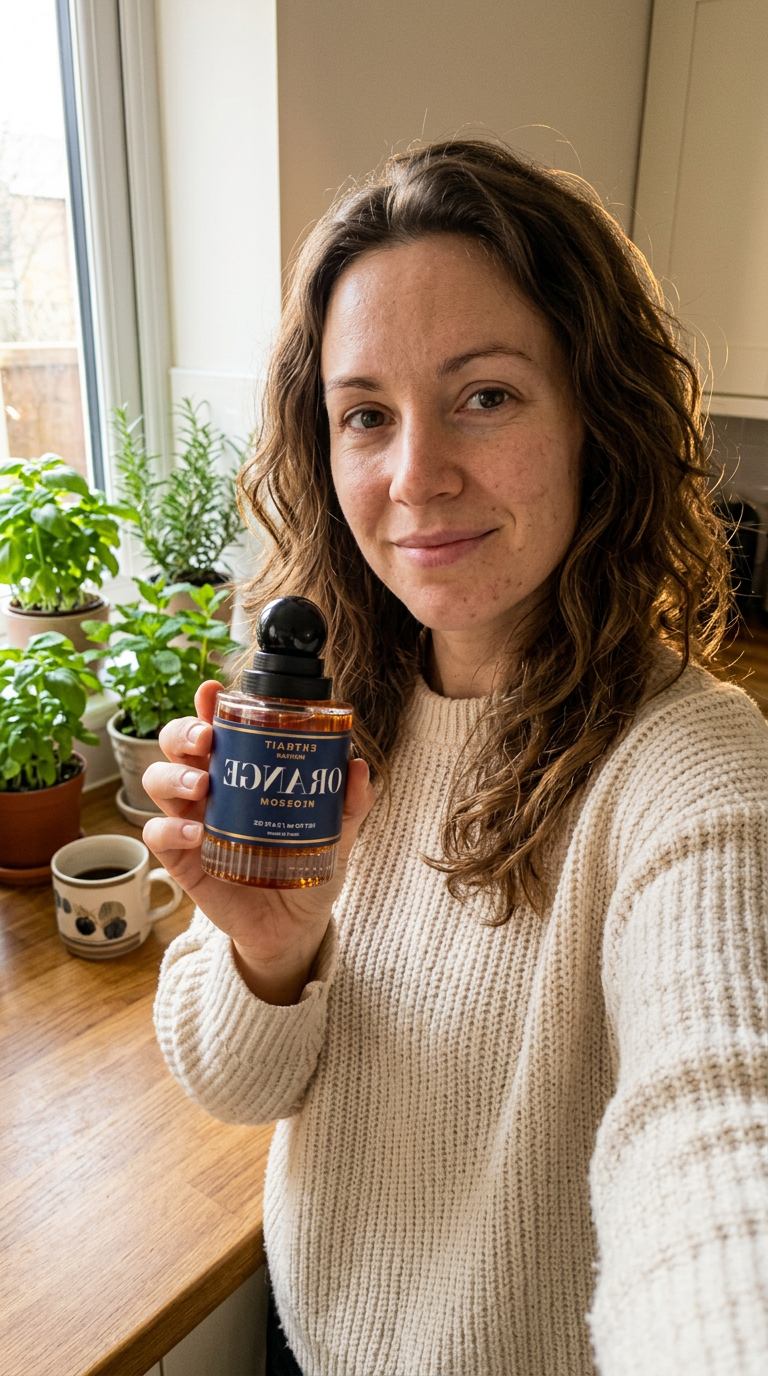
Cozy mom
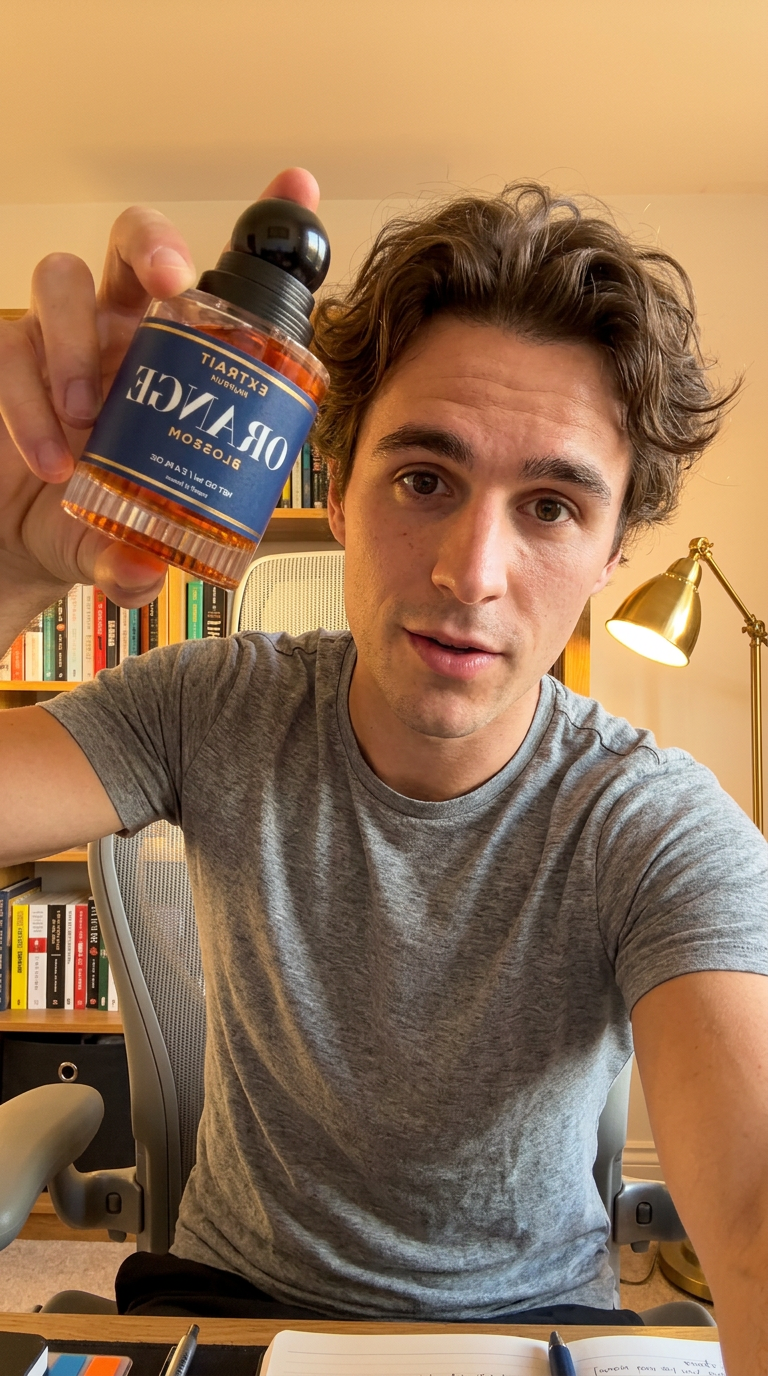
Tech guy
Why each preset is shaped this way
- Specific age, not "young woman". The model interprets vague ages as a soft average that drifts toward a generic mid-twenties stock-photo face. Naming an age locks the result.
- Wardrobe described as a fabric and a fit ("cream oversized hoodie", "fitted black athletic tee"), not a brand or a colour-only ("a hoodie", "black shirt"). Fabric words read as texture in the output.
- Location described by what is out of focus behind them, not by what they are in front of. "Dumbbells and a rack out-of-focus behind him" produces the bokeh-blob shapes that read as a real gym to the human eye, instead of a sharply rendered gym set that reads as a film studio.
- Lighting clause is non-negotiable. Without it, Seedance picks an even, ambient look that is the first tell that a video is synthetic. Naming the direction and quality of light ("soft window light from screen-left", "warm tungsten-tinted") is what makes the room feel lived-in.
- A "hand holding the phone" clause is the second non-negotiable. Without it, the model defaults to a static tripod-style framing that no real creator uses. The "subtle sway", "slight bounce", and "natural micro-shake" wording teaches the model to add the handheld feel that selfie footage actually has.
- A closing tone word at the end ("authentic", "cozy", "warm"). One word, deliberately vague. It nudges the output away from the polished commercial look the model defaults to.
The Seedance 2 prompt the LLM assembles
The Prompt Template node holds the formula that the LLM fills in with the selected character description and the script line. The point of the formula is to bake in every clause that is non-negotiable for this format, so that the only variable parts are the bits a user actually wants to change.
The lock-points and why each one matters
- "Front-facing smartphone camera, vertical 9:16, handheld". Locks the aspect ratio and the framing style. Without "handheld" the model produces gimbal-smooth video that does not read as real-creator footage.
- "Holding the exact product shown in the reference image up toward the lens with their free hand". The "free hand" detail is the one that stops the model from generating both hands holding the phone, which is the most obvious tell of an early synthetic UGC clip.
- "The product must match the reference image precisely (same shape, label, color, proportions)". This is the clause that does the heavy lifting on product fidelity. Without it the model treats the product image as a vague style reference and invents its own version. With it, the can is your can.
- "They look directly into the camera and say casually, mid-sentence". "Mid-sentence" is the underrated bit. Without it the model often starts the clip with a beat of silence before the talking, which reads as a stock-actor pause rather than a real creator who is already mid-take.
- "Visible pores and real skin texture, no filter, no cinematic color grade, no shallow depth of field". This is the anti-Instagram-filter clause. The model defaults to a glossy beauty look. Explicitly forbidding the filter look pulls it back toward documentary realism, which is what selfie footage actually looks like.
- "Lip movement must match the spoken line exactly". Belt and braces. Seedance 2 already syncs lips to the script in the prompt, but the instruction adds enough weight to the constraint that mismatched takes get re-sampled out of the result.
The system prompt that runs the assembly
The Prompt Builder node is a Gemini 3.1 Pro call. The user-input slot gets a combined string: the selected character description, followed by the script line. The system-prompt slot gets this formatter, which is what tells the model how to produce the final Seedance prompt every time without drift.
Why the system prompt is shaped this way
- It tells the model what the input looks like before it asks for a transform. Models that have to guess the structure of the input add their own framing words around it. Naming the two parts ("CHARACTER DESCRIPTION", "SCRIPT LINE") removes that.
- It gives the exact output template inline. Asking an LLM to "produce a Seedance prompt" without showing the template leads to creative drift across runs. Showing the template makes the model a fill-in-the-blanks function instead of a writer.
- It ends with a hard "Output ONLY" instruction. Without it, the model sometimes prefixes the output with "Here is the formatted prompt:" or wraps it in quote marks. Both break the downstream node that pipes the string into Seedance.
Model and settings that matter
Why Gemini 3.1 Pro for the formatter
The Prompt Builder uses Gemini 3.1 Pro with reasoning enabled and temperature set to 0. This is overkill for a fill-in-the-blanks task, deliberately. The reason is reliability: a deterministic, high-capability model with reasoning on will produce the same string for the same inputs every single time, which is what makes the workflow runnable on a schedule. A cheaper or hotter model adds tiny variations to the template wording, and over fifty runs you get fifty slightly different Seedance prompts and therefore fifty visually inconsistent videos.
A faster choice (Gemini 3 Flash, Haiku 4.5) would cut the formatter step from a few seconds to under one, at the cost of occasionally inventing a new word for "selfie-style" or dropping a clause. For a workflow where the next step costs real GPU money on Seedance, the formatter being boring and exact is worth the extra second.
Why temperature 0
Temperature 0 forces the model to pick the highest-probability token at every step, which kills creativity but maximises consistency. The formatter has no creative job. Its job is to copy the template, substitute two variables, and stop. Temperature 0 is the right call.
Why the product image is wired into the LLM, not just Seedance
The product image goes into the Prompt Builder as an image input even though the LLM never references the image in its output text. The reason: Wireflow passes that same image reference downstream as part of the assembled prompt context, so Seedance receives both the text prompt and the product image as a multi-modal input. Removing the image from the LLM node breaks the downstream reference chain, even though the text output looks identical with or without it.
Script lines that actually convert
The single biggest determinant of whether a UGC video performs is the first three seconds of dialogue. The workflow makes the production cheap, which means the script is now the bottleneck. A few patterns that work, and a few that do not.
Patterns that work
- Mid-sentence specificity. "...and then I realised my whole skincare shelf is basically just this one bottle." Starts with a connective, which makes it sound caught mid-thought, which reads as more authentic than a clean topic sentence.
- A small, specific number. "I genuinely have not bought another moisturiser in 47 days." The number does the work; the human brain rounds 47 to "real" and 50 to "made up".
- A near-confession framing. "I was not going to post about this because I thought it sounded fake, but..." Lowers the viewer's defences against a sales message because it pretends to acknowledge them.
- A peer-comparison hook. "My sister uses the expensive version and I genuinely cannot tell the difference." Names a relationship, which puts the viewer in a story instead of an ad.
Patterns that do not work
- Pure superlatives without specifics. "This is the best product I have ever used." The brain has heard this exact sentence a million times and tunes it out before the second word.
- Brand-name openers. "ProductX is a revolutionary new..." Reads as the cold open of an ad, which is what every TikTok algorithm is trained to skip past.
- Anything that sounds like a tagline. If you could put it on a billboard it is too polished. UGC works because it does not sound like marketing.
- Two sentences. Stick to one. The model handles a single sentence with one breath cleanly; a two-sentence script almost always produces a weird pause mid-clip that breaks the illusion.
Common failure modes
The product on screen does not match the reference image
Almost always caused by a busy reference image. If the photo has the product on a beach, in a hand, on a kitchen counter, the model splits its attention between the product and the surrounding scene. Re-export the product on a plain white or transparent background, re-run, and the fidelity comes back. If the product has fine text on the label (an ingredients list, a dosage), accept that the text will be readable as shapes but probably not legible as words. Seedance 2 is not a label-reading tool.
The lips do not match the words
Usually a script-line problem, not a model problem. Lines with consonant clusters that are hard to mouth ("strengths", "sixths") trip the lip-sync model. Same with fast brand names that span syllables awkwardly. Rewrite the offending word into a softer synonym and re-render. If the line is otherwise fine, a single re-render fixes it most of the time; Seedance has run-to-run variance on lip-sync within the same prompt.
The face looks too smooth, too polished, too AI
The anti-filter clause in the template ("visible pores and real skin texture, no filter, no cinematic color grade, no shallow depth of field") is doing its job most of the time, but the model occasionally drifts toward its glossy default. Strengthen the lighting clause in the character preset (add "harsh ceiling light" or "slightly overexposed window light"), which acts as a counter-weight against the beauty-mode look. If the same preset keeps producing uncanny output, that preset has a problem, not the workflow.
The creator is holding the phone with both hands and no product
The "free hand" clause occasionally gets lost in long prompts. Re-running usually fixes it. If it persists, move the "with their free hand" phrase earlier in the template, right after the camera setup, where it gets more attention weight.
The footage looks tripod-stable instead of handheld
The character preset is over-riding the template. Check that the preset includes the handheld-cue clause ("subtle handheld sway", "slight bounce from breathing", "natural micro-shake"). The four defaults all include one; a custom fifth preset will need one too.
Where to take it next
The workflow as it ships is the minimum viable version. A handful of natural extensions, in roughly the order people reach for them.
- Add a fifth and sixth character preset for the demographics your product actually sells to. The four defaults cover the most common audiences for consumer goods, but a B2B SaaS demo wants something like a "tired analyst in a coworking space"; a fitness supplement wants a fifth gym variant in a commercial gym instead of a home one.
- Wire a script generator into the Script Line node. Replace the static text with an LLM node that takes a product description and a hook category as input and writes the line. Then the whole workflow is two inputs (product image, hook category) instead of three.
- Swap Seedance 2 for a future video model when one beats it on identity stability or product fidelity. The workflow is structured so that the video node is the last step; changing it does not affect anything upstream.
- Add a render of all four characters in a single run, with a fan-out node, and produce a 4-up grid as the asset. Useful for a comp deck or a moodboard for a real creator brief.
- Add a voice-clone layer on top, with a separate ElevenLabs node that overdubs the synthetic creator with a specific brand-voice. The lip-sync is good enough that an overdub of a different voice is usually believable, as long as the energy of the dub matches the energy of the on-screen delivery.
The point of the workflow is not to replace creators. The point is to take the category of paid-social creative that is fully commoditised (faceless, generic UGC for cold traffic) and bring its cost-per-asset down to the level where you can actually run a real test instead of a single hero asset.